Headway Provider Login: How to Sign In to Sigmund
Last reviewed: October 30, 2026
The Headway provider portal is called Sigmund. It is where therapists and prescribers on Headway manage their calendar, clients, notes, payments and insurance status. This guide shows you how to reach the real login page and sign in safely.
Official login address: https://sigmund.headway.co/
This site is an independent guide and is not the login page. Never enter your Headway password on any site other than sigmund.headway.co.
Before you log in
You can only sign in once Headway has created your provider account. That normally happens after you speak with Headway and start the intake form. If you have not joined yet, read our credentialing guide first.
You will need:
- The email address you used when you signed up with Headway
- Your password, or access to your inbox if you sign in with an emailed link or need to reset it
- Your phone or authenticator app if two-factor authentication is turned on
How to log in to Sigmund, step by step
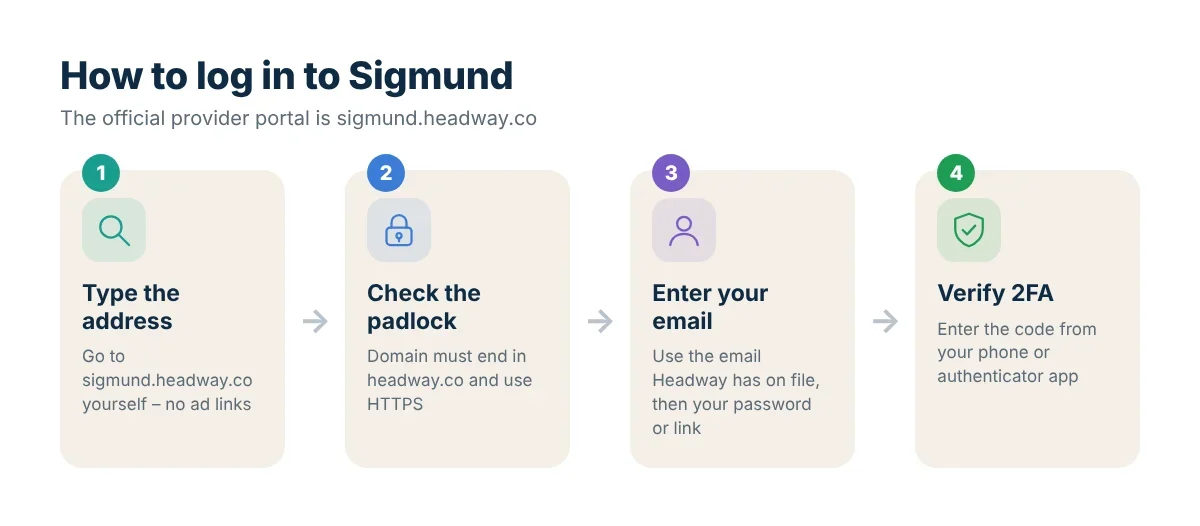
- Open the official address. Type
sigmund.headway.codirectly into your browser, or use a bookmark you created yourself. Avoid clicking login links in ads or unexpected emails. - Check the address bar. Make sure the domain ends in
headway.coand the page uses HTTPS (a padlock icon). - Enter your email address and follow the prompts. Depending on your account settings you will enter a password or receive a sign-in link by email.
- Complete two-factor authentication if asked. Enter the code sent to your phone or shown in your authenticator app.
- You land on your dashboard. New providers see a checklist of setup steps; completed steps show a checkmark.
Tip: once you are signed in, bookmark the dashboard. Next time you can go straight there instead of searching for “Headway login”.
Logging in from the official Headway website
If you prefer to start from Headway’s main site, go to headway.co, open the menu for providers and choose the provider login option. It takes you to the same Sigmund page.
Logging in on your phone
Sigmund works in a mobile browser. Open sigmund.headway.co in Safari or Chrome and sign in the same way. For writing notes and reviewing payments, a laptop is usually more comfortable.
Forgot your password or locked out?
- Use the “Forgot password” option on the login page and check your inbox (and spam folder) for the reset email.
- Make sure you are using the same email address Headway has on file. Many providers have a personal and a practice email.
- If you lost access to your two-factor device, contact Headway support through the Help Center so they can verify your identity.
Still stuck? Our login troubleshooting guide covers browser problems, expired links and other common errors.
Staying safe: avoid fake login pages
Because Headway handles protected health information and payments, scammers sometimes create look-alike pages. Protect your account:
- Only enter credentials on
sigmund.headway.co. - Headway will not ask you to share your password by email, text or phone.
- Turn on two-factor authentication.
- Use a unique password that you do not use for any other site.
- Sign out on shared computers.
What you can do after logging in
Once you are inside Sigmund you can set your availability, add and schedule clients, confirm sessions with CPT and diagnosis codes, write progress notes, message clients, track payouts and see when each insurance carrier has approved you. Our tour of Sigmund explains each tab.
FAQ
What is the Headway provider portal URL?
The official provider portal is https://sigmund.headway.co/.
Is Sigmund the same as the Headway provider portal?
Yes. Headway describes Sigmund as its proprietary platform that serves as your provider portal.
Can clients log in to Sigmund?
No. Sigmund is for providers. Clients use their own Headway account on headway.co.
Who do I contact if I cannot log in?
Contact Headway support through the Headway Help Center. This independent site cannot reset passwords or access accounts.