What Is Sigmund? A Tour of Headway’s Provider Portal
Last reviewed: October 30, 2026
If you have just joined Headway, you will hear the name Sigmund a lot. Sigmund is Headway’s own platform and serves as your provider portal: the one place where you finish onboarding, schedule clients, document sessions and get paid. This guide walks through every section so you know where things are before your first client.
To sign in, go to sigmund.headway.co. Step-by-step instructions are in our Headway provider login guide.
The dashboard
When you log in you land on a dashboard that lists your setup steps. Finished steps show a checkmark and steps you have started are labelled “In progress”. New providers should work through this list from top to bottom: intake form, bank details, availability, profile and so on.
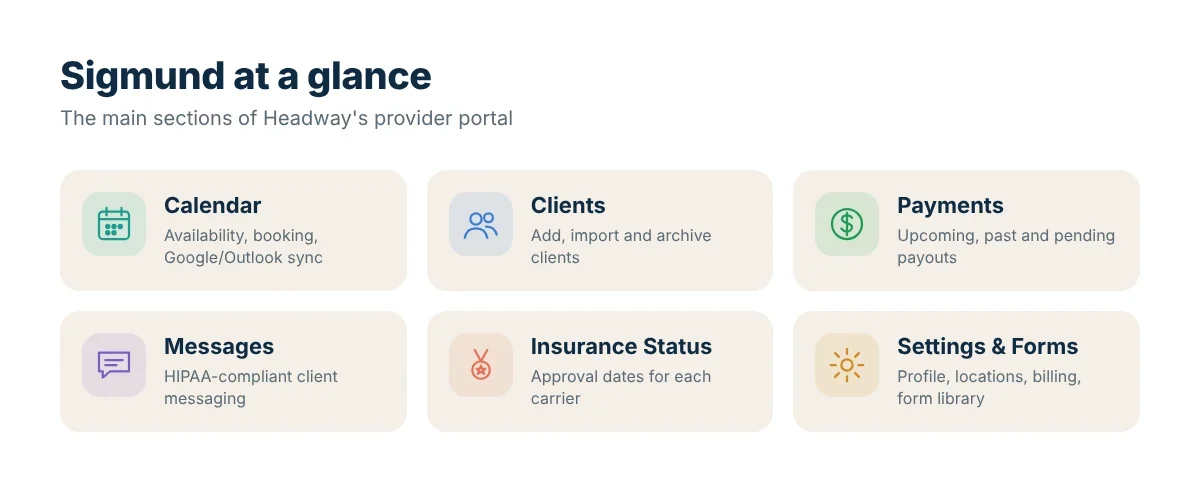
The main tabs in the sidebar
Calendar
Set your availability so clients can only book times you choose. You can import or export your calendar with Google Calendar or Outlook, which helps avoid double bookings if you also see clients outside Headway. You also create and edit sessions here and, after each appointment, confirm the session details.
Clients
Add new clients or clients you were already seeing before you joined Headway. You can enter insurance or private-pay details, set the client’s telehealth location and send intake forms or assessments. Clients you no longer see can be archived.
Payments
Headway collects payments from clients and insurers and sends you a combined payout twice a month. The Payments tab shows upcoming, past and pending payments, and you link your bank account under billing settings. See how and when Headway pays providers.
Messages
You can communicate with clients through any HIPAA-compliant method you choose, including Sigmund’s built-in messaging.
Insurance Status
This page shows when you can start seeing clients through each insurance carrier. Credentialing speed varies by insurer, so you may be approved with one plan weeks before another. It also shows an estimated date for guaranteed payment eligibility. Read our credentialing guide for typical timelines.
Form library
Templates for practice policies and informed consent, plus the option to create your own forms. Using the library saves time when you onboard new clients.
Settings
Edit your client-facing profile, telehealth and office locations, referral settings (for example, pausing new clients from a specific insurer), billing information, working hours and contact details.
Other useful links in Sigmund
- Contact us: chat with Headway support or use the virtual assistant.
- Refer a provider: Headway’s referral programme for colleagues.
- Headway Academy and Help Center: courses and articles for getting started. Headway also runs a regular onboarding webinar called “Sigmund 101”.
Sigmund as an EHR
Headway has expanded Sigmund into a full electronic health record (EHR) with embedded telehealth, scheduling, documentation, billing and client communication in one system, plus AI-assisted notes. We cover these features in Headway EHR features.
A simple weekly routine
Many providers find this routine keeps Sigmund tidy:
- Monday: check the Calendar for the week and confirm your availability.
- After every session: confirm the session with the CPT code, diagnosis code and progress note the same day.
- Mid-month and month end: review the Payments tab around the 15th and the last day of the month.
- Monthly: glance at Insurance Status and Settings to make sure your license, malpractice and bank details are current.
FAQ
Is Sigmund free?
Headway says its platform, including the EHR, is free for providers. Headway earns money from a share of session payments instead.
Can I use Sigmund for private-pay clients?
Yes. Headway’s Help Center says providers can still see private-pay clients, for example clients whose insurance Headway does not accept.
Is there a Sigmund app?
Sigmund runs in your web browser on desktop and mobile. Check Headway’s Help Center for the latest information on apps.
Sources: Introduction to Sigmund, Credentialing with Headway.